

Alternative Option to EFPTS
As an alternative to using the EFTPS system for purposes of paying the 20% withholding amount that applies to taxable distribution from a Solo 401k, some clients have chosen to wire funds via steps at the following IRS page as outlined in the “Same-Day Taxpayer Worksheet”: https://www.irs.gov/
If you decide to use the alternative method described above, visit here for a list of information to provide when having the funds wired by your bank and or brokerag firm that holds the solo 401k funds.
Using EFPTS
Here are some helpful tips for enrolling in the EFPTS to pay the mandatory federal 20% tax on each solo 401k distribution to the Department of the Treasury.
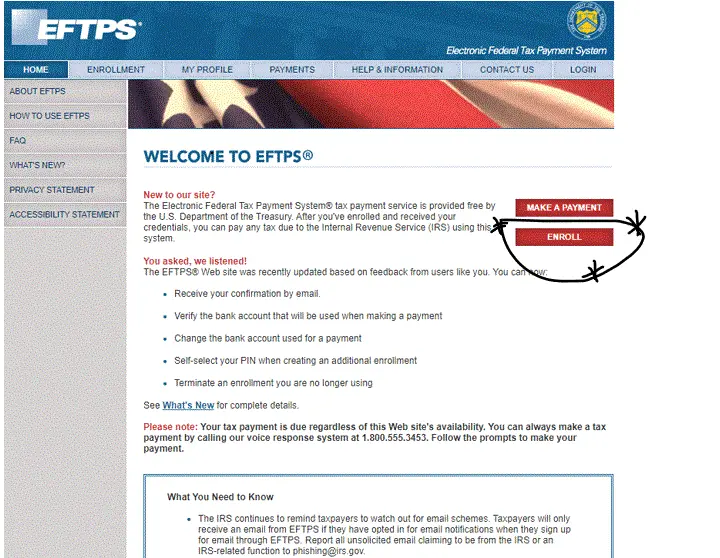
- Go to https://www.eftps.gov
- Enroll before making payment: Click Enroll
NOTE: Your first need to “ENROLL”
STEP 1 (ONE): Your first need to enroll before you can make a payment which won’t occur until you first receive your pin number in the U.S. mail.
Click on “Enroll”
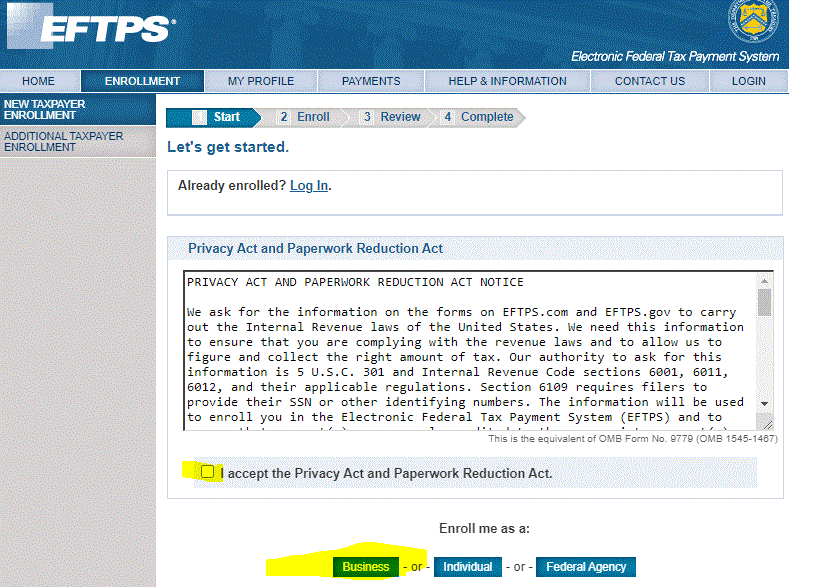
Step TWO (2):
- Review the Privacy Act and Paperwork Reduction Act.
- Click ” I accept the Privacy and Paperwork Reduction Act.”
- Under “Enroll me as a” click on “Business”
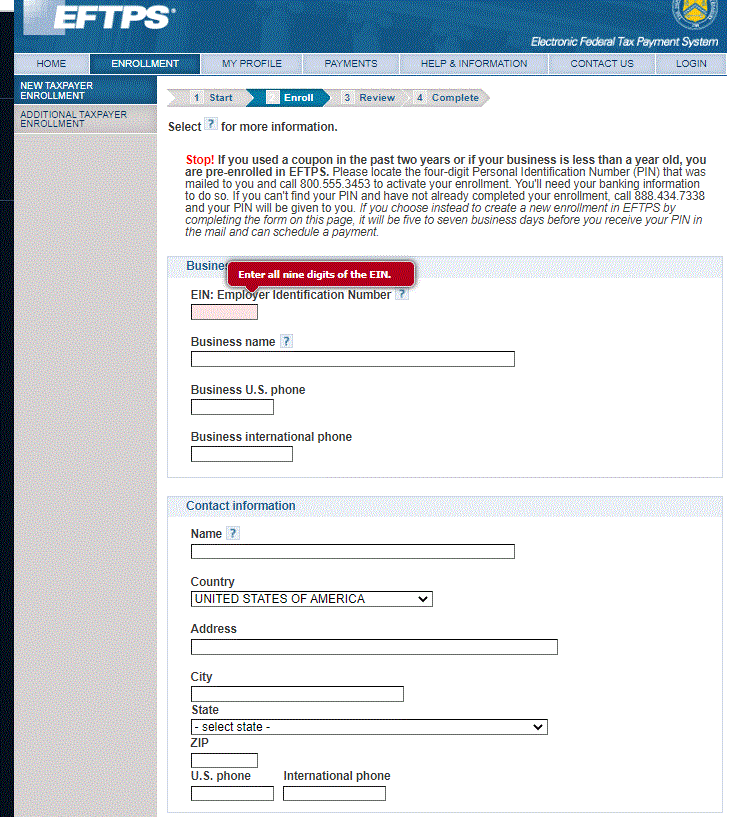
Step THREE (3):
Employer Identification Number (EIN): Enter the EIN for the solo 401k NOT your business or your SSN.
Business Name: Enter the name of your solo 401k
Business Phone: Enter your phone number
Contact Information: Enter your name, address, and phone number
Step THREE (3) Continued
Routing Number: Enter the solo 401k bank/brokerage account.
Account Number: Enter the account number for the solo 401k bank/brokerage account.

Step FOUR (4):
On the “Review” page review and then scroll down.
Enter your name, then enter the EIN for the solo 401k and click on “I accept the authorization agreement above.”

Step FIVE (5):
Print your enrollment confirmation page.

What happens next?
The IRS will mail out the pin number for making the federal tax payment from the solo 401k bank/brokerage account.
Once you receive the pin number in the mail, visit the EFTPS system https://www.eftps.gov/eftps/ and click on “MAKE A PAYMENT”
EFTPS Phone Number: 1-800-555-3453
QUESTION:
I’ve created an account with EFTPS. I log in using the EIN for the plan the PIN supplied by EFTPS and a password that I created. My log in is successful. Then, to make the payment, EFTPS asks me to select which form I want to use. The list is the following:

ANSWER:
The form type is Form 945.