
When an employer decides to establish a solo 401k plan, it must adopt a plan by signing a written plan document. There are two solo 401k establishment deadlines.
Deadline 1: Making both Employee & Employer Solo 401k Contributions
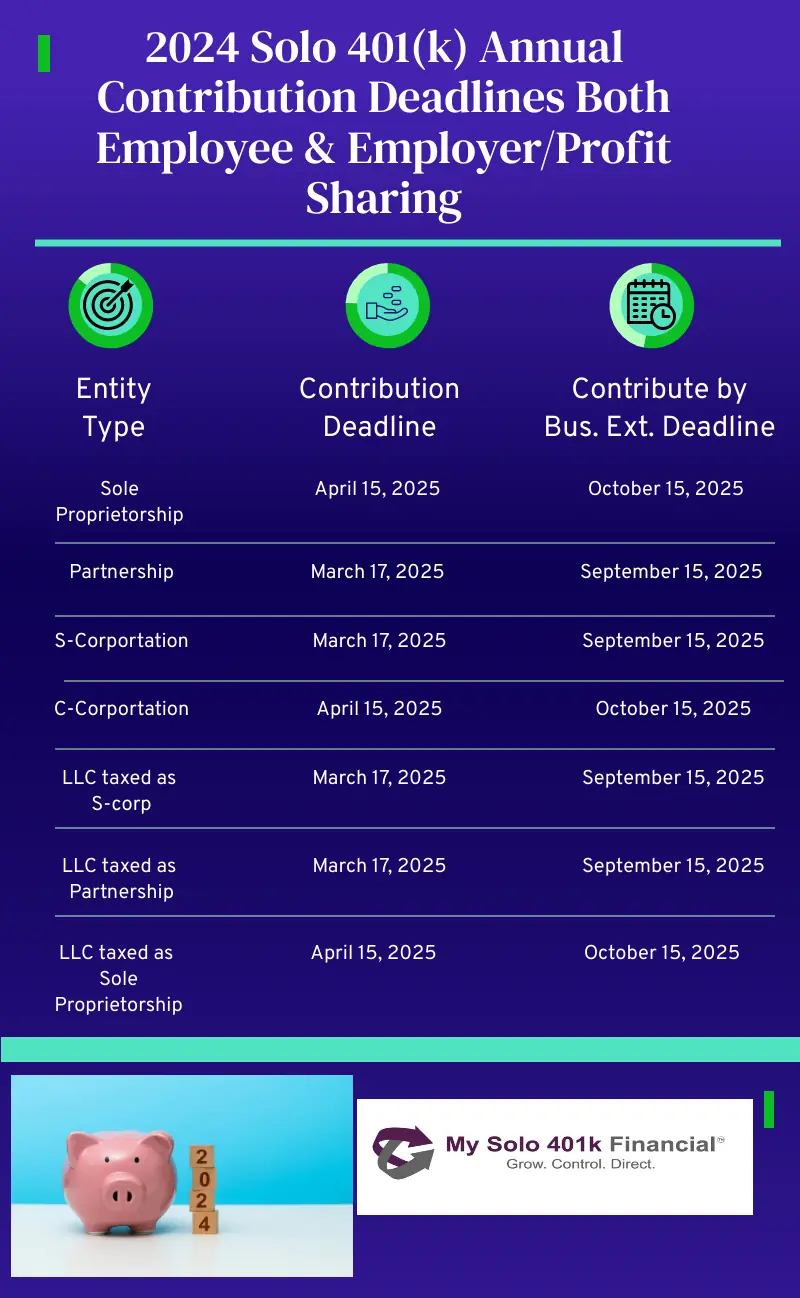
For a self-employed business taxed as an S-corporation, the solo 401k plan will need to be established/adopted by December 31, 2024 if you want to be able to make employee contributions for 2024 in 2025 by March 15 or by September 15 if you file a timely business tax return extension.
Deadline 2: Making just Employer Solo 401k Contributions
The SECURE Act expanded the deadline for self-employed businesses taxed as an S-corporation to establish a qualified solo 401k plan. For taxable year 2024, businesses taxed as an S-corporation will have until their business tax filing deadline in 2025, including extensions to establish and make the employer solo 401k contribution. However, if the solo 401k plan is not established until January 01, 2025 or after, you won’t be able to make employee solo 401k contributions, but can make both employer solo 401k contributions as well as voluntary after-tax solo 401k contributions.
Deadline for Establishing a Solo 401k Plan
The 2024 solo 401k setup deadline is fast approaching if your business is taxed as a S-corporation or an LLC taxed as an S-corporation. If you want to make employee pretax or employee Roth solo 401k contributions for the year 2024, then the solo 401k must be adopted by 12/31/2024. This means you simply need to sign the solo 401k plan documents by 12/31/2024 so that you can make a solo 401k contribution for 2024 in 2025 by your business tax return due date plus extension.
Otherwise, if you wait to open the solo 401k (i.e., sign the solo 401k documents) until 2025, you will be able to make employer profit sharing contributions and voluntary after-tax contributions but not pre tax employee or Roth solo 401k contributions. Click here to get started.
Click HERE for PowerPoint Slides